Configuring and using token exchange
Token exchange is the process that allows a client application to exchange one token for another token. In NQRust-Identity, two features implement token exchange:
- Standard token exchange: version 2 (V2) - This feature is the fully supported token exchange implementation that is enabled by default once the NQRust-Identity server is started.
- Legacy token exchange: version 1 (V1) - This preview feature is deprecated and not enabled by default once NQRust-Identity server is started. In future versions legacy Token Exchange will be replaced by version 2, JWT Authorization grant and other features.
The capabilities of NQRust-Identity for token exchange are as follows:
- A client can exchange an existing NQRust-Identity token created for a specific client for a new token targeted to a different client in the same realm.
- A client can exchange an existing NQRust-Identity token for an external token, such as a linked Facebook account.
- A client can exchange an external token for a NQRust-Identity token.
- A client can impersonate a user.
The standard token exchange supports only use-case (1). The legacy token exchange supports the four use-cases, but it is a preview and deprecated feature. Therefore, the standard token exchange V2 is recommended since it is supported and will be maintained for the future. The legacy token exchange is useful for last three use cases, but it may not be backwards compatible with future NQRust-Identity versions, and it will be finally removed. You can also enable both token exchange features and use them together. For example, you could use both internal-internal exchange provided by V2 together with other use cases that are supported by V1. For more details, see this token exchange comparison.
Standard token exchange
Standard token exchange in NQRust-Identity implements the Token exchange specification (opens in a new tab). It allows client application to exchange an existing NQRust-Identity token created for a specific client for a new token issued to the client that triggered the token exchange request. Both clients must be in the same realm.
Token exchange flow
Consider this typical token exchange flow:
-
The user authenticates with the use of the NQRust-Identity SSO to the client application
initial-client. The token is issued to theinitial-client. -
The client
initial-clientmay need to use the REST servicerequester-client, which requires authentication. So theinitial-clientsends the access token from step 1 to therequester-clientwith the use of the token -
To serve the request, the
requester-clientmay need to call another servicetarget-client. However it may be unable to use the token sent to it frominitial-client. For example:The token has insufficient permissions or scopes. The
target-clientis not specified as the token audience; the token was intended to be used to invokerequester-client. The token has too many permissions; therefore, therequester-clientmay not want to share it with thetarget-client.Any of these situations could be the reason to invoke the token exchange. The
requester-clientmay need to send the token exchange request to the NQRust-Identity server and use the original token from step 1 as the subject token and exchange it for another token requested token. -
The requested token is returned to
requester-client. This token can now be sent to thetarget-client. -
The
target-clientcan fulfill the request and return the response to therequester-client. Therequester-clientcan then follow and return the response to the request from step 2.
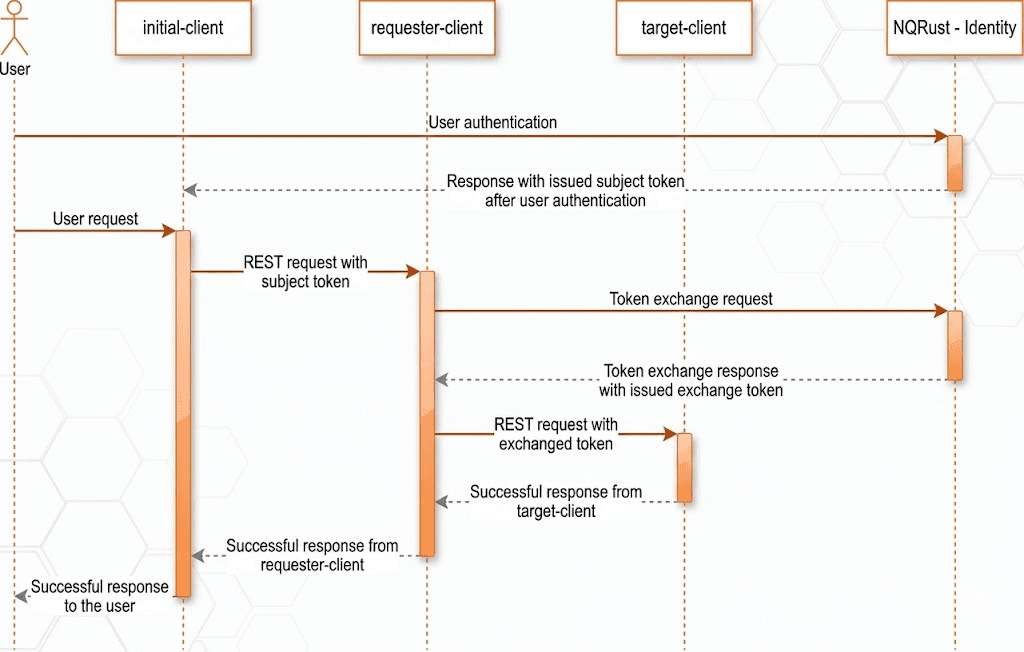
Many other use-cases exist for token exchange, but the preceding example is the most typical.
Example token exchange request
The following is an example token exchange request of the client requester-client in the realm test. Note that subject_token is the access token issued to the initial-client:
POST /realms/test/protocol/openid-connect/token
Authorization: Basic cmVxdWVzdGVyLWNsaWVudDpwYXNzd29yZA==
Content-Type: application/x-www-form-urlencoded
Accept: application/json

grant_type=urn:ietf:params:oauth:grant-type:token-exchange&
subject_token=$SUBJECT_TOKEN&
subject_token_type=urn:ietf:params:oauth:token-type:access_token&
requested_token_type=urn:ietf:params:oauth:token-type:access_token
The example token exchange response may look like this:
{
  "access_token": "eyJhbGciOiJSUzI1NiIsIn...",
  "expires_in": 300,
  "token_type": "Bearer",
  "issued_token_type": "urn:ietf:params:oauth:token-type:access_token",
  "session_state": "287f3c57-32b8-4c0f-8b00-8c7db231d701",
  "scope": "default-scope1",
  "refresh_expires_in": 0,
  "not-before-policy": 0
}
How to enable token exchange
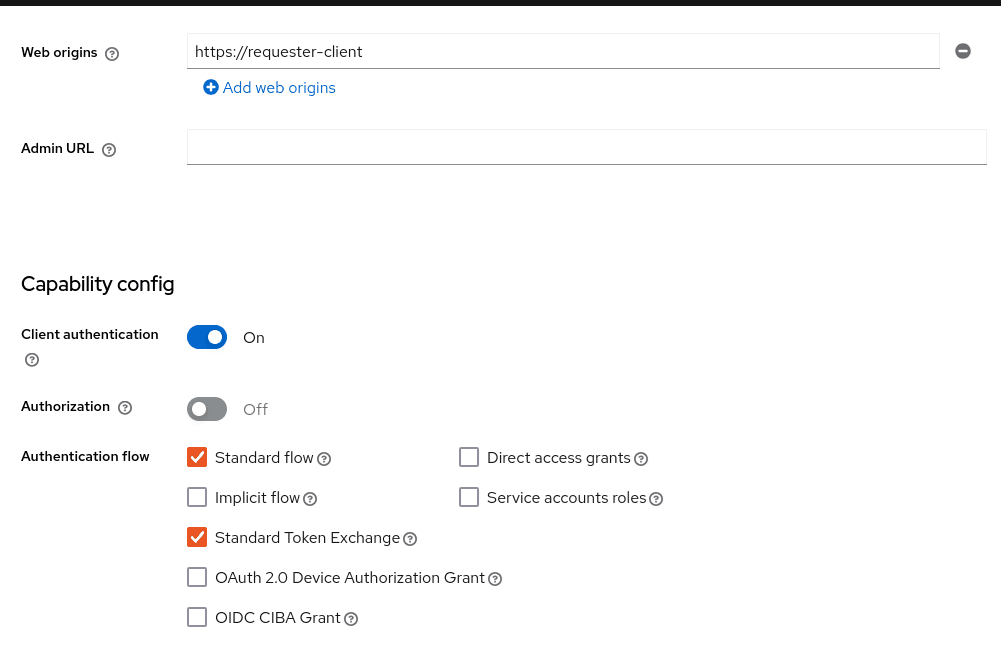
For standard token exchange, token-exchange-standard:v2 is enabled by default. However, you also need to enable the Standard token exchange switch for
the client that is supposed to send token exchange requests, such as the requester-client from the previous example. Note that requester-client must be a confidential client.
Also, as is the case for other grant requests, the token exchange requests must be authenticated by the appropriate client authentication method that is configured for the client.
Request and response parameters
The parameters are aligned with the Token exchange specification (opens in a new tab), which are described as follows:
grant_type
REQUIRED. The value of the parameter must be urn:ietf:params:oauth:grant-type:token-exchange.
subject_token
REQUIRED. A security token that represents the identity of the party on behalf of whom the request is being made.
subject_token_type
REQUIRED. This parameter is the type of the token passed in the subject_token parameter. This must be urn:ietf:params:oauth:token-type:access_token when the standard token exchange is being used
because NQRust-Identity does not support other types for the standard token exchange.
requested_token_type
OPTIONAL. This parameter represents the type of token that the client wants to exchange for. In this version, only oauth and OpenID Connect token types are supported. The default value for this
is urn:ietf:params:oauth:token-type:access_token. Another possible value is urn:ietf:params:oauth:token-type:id_token if the ID token issued to requester-client is requested. The possible value might
be also urn:ietf:params:oauth:token-type:refresh_token; in this case, you will receive both an access token and refresh token within the response. However, the refresh token is allowed if the Allow refresh token in Standard Token Exchange client configuration option is enabled as specified in the standard token exchange section.
scope
OPTIONAL. This parameter represents the space-delimited set of OAuth and OpenID Connect scopes that the client is requesting. You can use optional client scopes
of the requester-client. For more details, see scopes and audiences. Omitting this parameter means that only
the default client scopes are effectively used.
audience
OPTIONAL. Audience specifies client_id of the client, which is supposed to be used as the token audience. In the example above, it could be target-client. Multiple
values of this parameter are allowed, which means that you want the token to contain multiple audiences to be used by requester-client in multiple different services. For example
audience=target-client1&audience=target-client2 can be used in the request. More details in the section about scopes and audiences.
A successful response is returned in the JSON format. It contains similar parameters such as the response from other grants. The following are some token exchange specifics of the more notable parameters:
access_token
The requested access token. Note that if request specified requested_token_type=urn:ietf:params:oauth:token-type:id_token, this parameter may actually contain the ID token instead of access token.
This behavior is per the token exchange specification (opens in a new tab).
refresh_token
The refresh token. It is included just if requested_token_type=urn:ietf:params:oauth:token-type:refresh_token is used and the client has enabled issuing refresh tokens from the token exchange
issued_token_type
The issued requested token type. Same value as requested_token_type used in the request.
token_type
Usually Bearer if issued token type was access token or refresh token. In case of ID token requested, the value is N_A
Scopes and audiences
The scope parameter in the token exchange request has the same meaning as other grants. This parameter is optional. When it is omitted, the effective client scopes used in the request are
the default client scopes of the requester-client. When this parameter is used, the effective client scopes are the default scopes together with
the optional client scopes.
By default, the used client scopes will add the audiences to the aud claim of the token based on the used client scopes and client roles.
The audience parameter can be used for filtering of audiences, so that the aud claim will contain only the audiences specified by the audience parameter. Similarly the client roles in the token will
be filtered and the token will have only the client roles of the clients specified by the audience parameter.
In addition, the audience parameter can be used to potentially filter client scopes as well. It works in a manner that is similar to client scope permission for users.
If the client scope does not contain any client roles (for example, it contains zero roles or it contains only realm roles), no additional filtering occurs for client scopes. However, if the client scope contains any
client role mappings, it must include some client roles of the clients requested by the audience parameter. Composite roles are also included for consideration. If the client scope contains no client
roles of the clients requested by the audience, the client scope will be filtered.
The audience parameter can be used to filter the audiences that are coming from the used client scopes. However, this parameter will not add more audiences. When the audience parameter is omitted,
no filtering occurs. As a result, the audience parameter is effectively used for "downscoping" the token to make sure that it contains only the requested audiences. However, the scope parameter is used
to add optional client scopes and hence it can be used for "upscoping" and adding more scopes.
By default, token exchange can be used to request extra scopes and audiences that are not present in the initial subject_token. If, for security reasons, you want to ensure that scopes are limited to the ones already granted to the subject_token, the downscope-assertion-grant-enforcer policy executor can be applied to the client. This executor enforces that only downscoping is allowed for token exchange.
Examples
Here are some examples to better illustrate the behavior for scopes and audiences.
Assume we have the realm with:
- Client
target-client1with the client roletarget-client1-role - Client
target-client2with the client roletarget-client2-role - Client
target-client3with the client roletarget-client3-role - Client scope
default-scope1. This client scope has role scope mapping for the client roletarget-client1/target-client1-role - Client scope
optional-scope2. This client scope has role scope mapping for the client roletarget-client2/target-client2-role - Client
requester-client, which has client scopedefault-scope1added as default client scope and scopeoptional-scope2added as an optional client scope - Authenticated user, who is member of both
target-client1-roleandtarget-client2-role
The settings above means that using scope default-scope1 will add the audience target-client1 to the token and using optional-scope2 will add the audience target-client2. This is because of how audiences are resolved from client scope role mappings.
Example 1
Token exchange request sent with scope=optional-scope2 and without audience parameter:
There will be no filtering of audience. The scopes and audiences will be resolved as is the case for any other grants. The response token will be similar to this (claims not interesting for this example omitted for brevity):
{
  "azp": "requester-client",
  "scope": "default-scope1 optional-scope2",
  "aud": [ "target-client1", "target-client2" ],
  "resource_access": {
	"target-client1": {
  	  "roles": [ "target-client1-role" ]
	},
	"target-client2": {
  	  "roles": [ "target-client2-role" ]
	}
  },
  ...
}
Example 2
Token exchange request sent with scope=optional-scope2 and with audience=target-client2
Same like previous example, but target-client1 audience and client roles filtered due audience parameter was included, but only with this target-client2 client. The client scope default-scope1 will be
also filtered because it contains some client roles but no client roles of the requested audience client target-client2. So the token would be as follows:
{
  "azp": "requester-client",
  "scope": "optional-scope2",
  "aud": [ "target-client2" ],
  "resource_access": {
    "target-client2": {
      "roles": [ "target-client2-role" ]
    }
  },
  ...
}
Example 3
Token exchange request sent with scope=optional-scope2 and with audience=target-client2&audience=target-client3
The target-client3 is not part of the token audience as user does not have any roles. So in this case, the request will be rejected as some of the requested audiences are not available.
As mentioned in the token exchange specification, it is good practice to downscope the token as much as possible and use only the audiences needed. Ideally use a single audience. This strategy increases the probability that request will be allowed.
If you have a more complex deployment with many various scopes and audiences, it can be challenging to model it in an appropriate way. Consider using the Client scopes → Evaluate tab in the Admin Console to test if the token looks as expected for the given user and for the given set of scopes and audiences.
Token exchange - Additional details
These additional points clarify the behavior of token exchange.
-
It is not supported for public clients to send the token exchange requests. Token exchange V1 includes very limited support for public clients, allowing public clients to exchange the token to itself with fewer scopes. This use case can be replaced by refresh token grant.
-
The
subject_tokensent to the token exchange endpoint must have the requester client set as an audience in theaudclaim. Otherwise, the request would be rejected. The only exception is, if client exchanges his own token, which was issued to it. Exchanging to itself might be useful to downscope/upscope the token or filter unneeded token audiences and so on. -
Sender-constrained tokens (as defined in RFC 7800) cannot be used as
subject_token. This includes DPoP-bound tokens and X.509 certificate-bound tokens. Standard Token Exchange only accepts Bearer access tokens as subject tokens. If you provide a sender-constrained token, the request will be rejected with aninvalid_requesterror. However, you can obtain DPoP-bound tokens as output from token exchange by including a valid DPoP proof in the request. For more details, see Securing applications with Demonstrating Proof-of-Possession (DPoP). -
Consents - If the requester client has Consent required enabled, the token exchange is allowed only if the user is already granted consent to all requested scopes
-
Fine-grained admin permissions (FGAP) are not needed for the standard token exchange. We plan to eventually integrate with FGAP for the future, but that integration might be available to all grants. It will not be specific only to token exchange as it was in token exchange V1.
-
Integrating token exchange with Client policies is possible. This integration can be useful to address certain use cases. For example, consider the use case to reject the token exchange request if the client
requester-clientsends the request withscope=some-confidential-scope. In this example, it can be useful to create a client policy condition with combined conditions forclient-scope,grant-typeandclient-roles. -
Requesting a refresh token is allowed only if the client has the switch Allow refresh token in Standard Token Exchange set to a value other than
No(the default value). The switch is available in the Admin Console in the Advanced tab of the OIDC client in the OpenID Connect Compatibility Modes section. The other available value of the switch is Same session, which means that the refresh token is allowed only if the refresh token can use the same user session as the subject token. If that subject token is coming from a Transient session or from an Offline session, the requesting refresh token will not be allowed. Similarly it will not be allowed to request an offline token (usingscope=offline_access).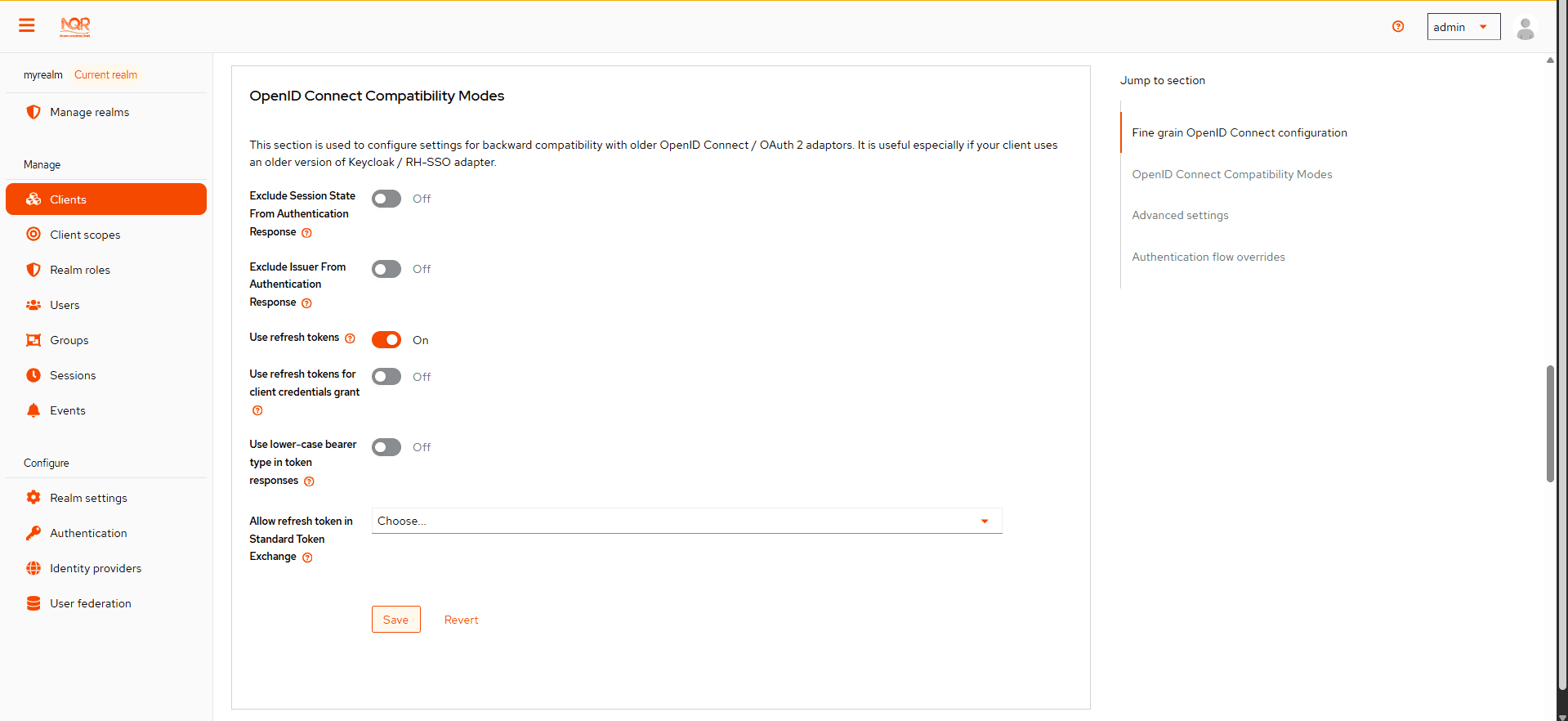
-
Token exchange never creates a new user session. In case that
requested_token_typeis a refresh token, it may eventually create a new client session in the user session for the requester client (if the client session was not yet created). -
NQRust-Identity Token exchange does not yet have support for the
resourceparameter. -
The token exchange specification mentions the concepts of impersonation and delegation (opens in a new tab). NQRust-Identity has support for the impersonation use case, but not yet for the delegation use case.
Revocation
Assuming that there is a subject token access-token1 issued to the client initial-client, here are some considerations related to token revocation:
-
For the case when the
access-token1was exchanged to theaccess-token2of the clientrequester-client, the revocation of theaccess-token1will not revokeaccess-token2. Supporting of a "revocation chain" for access tokens would mean quite an overhead. So considering this, the administrator must ensure that access tokens are short-lived and are revoked automatically after some time. -
For the case when
access-token1was exchanged torefresh-token2of clientrequester-client, we try to support revocation chain. This means that:- Revocation of
access-token1will revoke alsorefresh-token2. Moreover this will remove the client session of the clientrequester-clientfrom the user session and hence all refresh tokens ofrequester-clientin this user session will be effectively revoked - In case that
refresh-token2and it’s related access token was used for the further token exchange to different client, then revocation ofaccess-token1will revoke those subsequent token exchanges as well. In other words, the whole "chain" of exchanged tokens is going to be revoked. - Note that the access token should be valid when the revocation endpoint is invoked. If you do not have a valid access token when the original
access-token1has expired, you can potentially use another access token issued to same client in the same user session. The exchanged tokens such asrefresh-token2and others from the "chain" should be revoked.
- Revocation of
Comparison of standard token exchange and legacy token exchange
While the preceding sections fully detail standard and legacy token exchange, the following is an overall summary that compares the two token exchange methods.
| Capability | Standard token exchange V2 | Legacy token exchange V1 |
|---|---|---|
| Internal-internal token exchange | Supported. Implemented as per RFC 8693 | Preview support. Loose implementation of RFC 8693. It is recommended to use V2 instead |
Allowed subject_token_type | Access token type only | Access token type only for internal-internal, JWT for external-internal scenarios |
Allowed requested_token_type | Access token (default), Refresh token, ID token | Access token, Refresh token (default), SAML 2.0 assertion |
Behavior of scope parameter | Aligned with other grants. Scope parameter means requesting optional scopes of the client, which sent the token exchange request | Scope parameter based on the scopes of the "target" client specified by audience parameter. Downscoping support only |
Behavior of audience parameter | Support for more values as per the specification. It can be used to narrow down the available audiences and keep only the requested audiences. Effectively downscoping the token per the required target audience | Support for single audience value. Token effectively issued to the client requested by the audience parameter and using the scopes of that client |
| Public clients | Not available. Downscoping implemented by V1 can be replaced by refresh token grant | Available only to exchange token of the client itself. Effectively downscoping support only |
| Consents | Allowed for clients with Consent required as long as the user is already granted consent | Not allowed for clients with Consent required |
| Authorization | Verification that the requester client must be in the audience of the subject_token. Integration with client policies. No Fine-grained admin permissions | Based on fine-grained admin permissions version 1 |
| Revocation chain | Not available for access tokens. Available for refresh tokens | Not available for access nor refresh tokens |
| Delegation per RFC 8693 | Not supported yet | Not supported |
| Resource parameter per RFC 8693 | Not supported yet | Not supported |
| Internal to external Token Exchange | Identity brokering APIs can be used instead. See Identity Brokering APIs for more information. | Implemented as a preview |
| External to internal Token Exchange | Use-case implemented by Standard Token Exchange V2 and JWT Authorization Grant. See OAuth Identity and Authorization Chaining Across Domains for more information. | Implemented as a preview |
| Subject impersonation (including direct naked impersonation) | Not implemented yet | Implemented as a preview |